We deliver across the EU. Pick the language you prefer; you can change it later at the top of the page.
Neu: clightstore.de ist jetzt Teil von clightstore.com.
Gleiche Produkte, gleiche Preise, gleiches Team. Bestellungen aus unserem bisherigen Shop werden wie gewohnt bearbeitet. Kundenkonten und Bestellhistorie des alten Shops sind vorübergehend nicht verfügbar. Bei Fragen erreichen Sie uns unter sales@clightstore.com.
Cuenta
UGR Value Explained: Glare Limitation in Practice
What does UGR < 19 really mean? This guide explains the UGR value in accordance with standards for all segments – from offices to sports halls – and shows you how to read datasheets correctly.
12 min readBy Clightstore lighting plannersUpdated 21.10.2026
The UGR value (Unified Glare Rating) describes how strongly a lighting installation causes glare – making it one of the most important parameters for visual comfort in the workplace. It does not apply to a single luminaire but to the entire installation in the specific room, and is governed by DIN EN 12464-1 for indoor workplaces as well as further standards for sport and outdoor areas.
In brief
UGR stands for Unified Glare Rating – an internationally standardised measure of glare from lighting installations (scale 10–30).
DIN EN 12464-1 defines limit values (UGRL) in steps: 13, 16, 19, 22, 25 and 28 – depending on the visual task.
UGR is not a product property but an installation value – the datasheet value applies only to a standardised reference situation.
Different segments have different requirements: office UGRL ≤ 19, warehouse UGRL ≤ 25, sports hall UGRL ≤ 22.
For standards-compliant light planning, a DIALux calculation is recommended – the datasheet value alone is not sufficient.
What is the UGR Value? Definition and Fundamentals
UGR stands for Unified Glare Rating – a standardised method developed by the International Commission on Illumination (CIE) and now the worldwide standard for evaluating direct glare from lighting installations indoors.
The UGR scale runs from 10 to 30. A low value indicates little glare; a high value indicates strong glare. In practice, values below 10 are rarely relevant; values above 28 are considered unacceptable for work areas.
Important: the UGR value cannot be measured – it is calculated exclusively. The calculation takes into account the luminance of the luminaires, their arrangement in the room, the room geometry, and the reflectances of the ceiling, walls and floor.
Psychological vs. Physiological Glare
The UGR value captures psychological glare – the subjective discomfort caused by excessively bright light sources in the field of vision, without visual performance necessarily being impaired. This is distinct from physiological glare, in which visual acuity actually decreases (e.g. due to backlighting or reflections on screens). Both forms are relevant to workplace design but are assessed using different methods.
The UGR Scale and Standard Limit Values per DIN EN 12464-1
DIN EN 12464-1 (Lighting of workplaces – Indoor workplaces) specifies a maximum UGR limit value for each work area. Because these are upper limits, the standard refers to them as UGRL (Unified Glare Rating Limit). The installation must meet or remain below this value.
The standard defines the following steps: 13, 16, 19, 22, 25 and 28. There are no intermediate values between these steps – a calculated installation value of 20 therefore corresponds to step 22.
UGRL Step
Glare Perception
Typical Application
≤ 13
Barely perceptible
Operating theatres, precision assembly
≤ 16
Low
Technical drawing, CAD workstations
≤ 19
Acceptable
Offices, screen-based workstations, schools
≤ 22
Noticeable, tolerable
Sports halls, assembly areas, reception
≤ 25
Disturbing with prolonged exposure
Warehouses, traffic routes, coarse assembly
≤ 28
Strongly disturbing
Acceptable only for brief periods
Standards Table: UGR Requirements by Segment
A common mistake in practice: UGRL ≤ 19 is treated as a universal standard. In reality, requirements vary considerably depending on use. The following table summarises the most important segments in accordance with the relevant standards.
In logistics warehouses UGRL ≤ 25 applies – however, for order-picking operations a more stringent requirement of UGRL ≤ 22 is recommended.
Is UGR a Property of the Luminaire or the Room?
This question is crucial for correct product selection. The UGR value is not a fixed product property – it always describes the entire lighting installation in the specific room. The same luminaire can produce a UGR of 22 in a small, dark room and only a UGR of 17 in a large, light-coloured room.
Nevertheless, datasheets frequently include statements such as "UGR < 19". These refer to a standardised reference situation: room dimensions 4H × 8H (H = mounting height above the working plane), reflectances of ceiling 70%, walls 50%, floor 20%. Unless the manufacturer states otherwise, this reference applies.
The datasheet value is therefore a useful comparative figure – but not proof of standards compliance for your specific project.
When Can No UGR Value Be Stated?
For certain luminaire types, stating a UGR value is by definition not possible: this applies to luminaires with an indirect component of more than 65%, to narrow-beam spotlights, and to asymmetrically emitting luminaires. In these cases, the basis for the standardised tabular calculation is absent.
When purchasing LED luminaires for commercial projects, buyers and planners regularly encounter UGR specifications in datasheets. Here is what you need to know:
The UGR Tabular Method
Manufacturers determine the datasheet UGR value using the CIE tabular method. A table of UGR values is produced for the luminaire covering various room geometries (expressed as ratios X/H and Y/H) and observer positions. From this table, the UGR value can be read off for different room situations – provided the complete table is included in the datasheet.
Many datasheets, however, state only the value for the standard reference (4H/8H). For non-standard room geometries – such as very low rooms or square floor plans – a complete DIALux calculation is essential.
Checklist: What to Verify Before Purchasing
Does the datasheet state a UGR value? If so: for which reference situation does it apply?
Does the reference situation (4H/8H, reflectances) correspond to your planned room?
Is the stated UGRL value below the standard limit for your application?
Is a complete UGR table available in the datasheet?
Has a DIALux calculation been carried out for the project using the actual room parameters?
Segment-Specific Glare Issues: What Standards Do Not Fully Cover
Sports Halls: Upward Line of Sight
The UGR tabular method was developed for a horizontal line of sight – that is, for seated or standing persons looking straight ahead. In sports halls, however, athletes frequently look upwards: in volleyball, basketball or badminton the ceiling is permanently within the field of vision.
DIN EN 12193 explicitly notes that in such cases additional measures may be required – such as narrower shielding angles, reflectors or a targeted luminaire arrangement. The UGR tabular value alone is not sufficient as proof here. For the light planning of LED sports field lighting we always recommend a complete photometric calculation.
Industrial Halls: Dynamic Viewing Angles
In production and warehouse halls with forklift or pallet truck traffic, viewing angles change constantly. Drivers look in various directions when manoeuvring – including upwards towards the luminaires. Here, luminaires with narrow beam angles and high shielding angles (≥ 65°) are particularly important in order to minimise glare in dynamic situations.
For LED high bays in industrial environments, you should check the shielding angle and the light distribution curve in the datasheet in addition to the UGR value. Also note the appropriate IP protection ratings for dusty or damp environments.
Outdoor Areas: DIN EN 12464-2
For outdoor work areas – yards, loading zones, traffic routes and industrial outdoor surfaces – DIN EN 12464-2 applies. UGR limit values are defined here too, typically UGRL ≤ 25. The calculation is carried out analogously to the indoor standard, but taking into account the open room geometry and the absence of ceiling reflectance.
Linear LED light systems often achieve better UGR values in production halls than point-source high bays, owing to their area-wide light distribution.
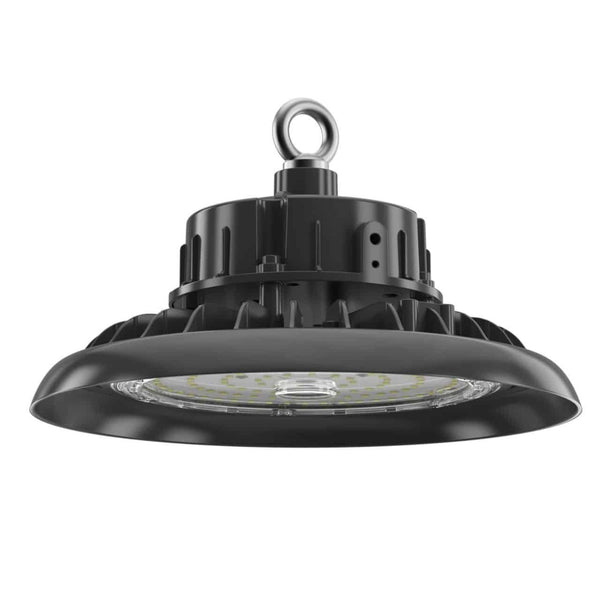
LED high bays for industry and warehouses – high efficiency, IP65 protection, dimmable:
UGR and Light Planning: Why DIALux Is Indispensable
The only way to provide standards-compliant proof of the actual UGR value of a lighting installation is a photometric calculation using actual room parameters. DIALux is the most widely used software for this purpose in Europe and is accepted by planners, architects and authorities.
The DIALux calculation incorporates: room geometry, reflectances of all surfaces, luminaire type and arrangement, mounting height, and the photometric data (IES or LDT file) of the luminaires used. The result is a UGR value for defined observer positions – and therefore a reliable proof of standards compliance.
Clightstore offers B2B customers a free DIALux light planning service. Our lighting planners calculate the UGR value for your specific project and provide standards-compliant planning documentation – including illuminance values, uniformity and colour rendering. Further information on light distribution and planning can be found in our guide Light Distribution on Sports Fields: Standards & Planning.
UGR and Product Selection: What B2B Buyers Should Look For
For buyers and facility managers procuring luminaires without their own light planning, the following rule of thumb applies: a datasheet UGR value that is at least one step below the standard limit provides a safety margin for less favourable room situations.
Example: for an office with UGRL ≤ 19, you should select luminaires that state UGR < 19 in the datasheet – not UGR < 22. This ensures an adequate margin even with non-standard room geometries or darker wall colours.
For LED Panels 120×30 and LED Panels 60×60 with a stated UGR < 19, our shop offers a wide selection of standards-compliant products. LED tri-proof lights for production areas are also available with corresponding UGR specifications.
Planning the UGR value is a computational task – implementation is not. All installation and connection work on 230V and 400V systems must be carried out exclusively by qualified electricians. DIN VDE 0100, DGUV Regulation 3 and the 5 safety rules apply. Further guidance can be found in our guide Connecting an LED Lamp: Step-by-Step Guide.
Frequently Asked Questions About the UGR Value
What does UGR < 19 mean in practice?
UGR < 19 means that the lighting installation achieves a calculated glare value of below 19 in the reference situation (room 4H × 8H, reflectances: ceiling 70%, walls 50%, floor 20%). This is the standard limit for offices and screen-based workstations per DIN EN 12464-1. In practice it means: the glare is acceptable for continuous work and does not cause significant discomfort.
Is the UGR value a property of the luminaire or the room?
Both influence the UGR value – but it is primarily an installation value. The same luminaire type can produce different UGR values in different rooms, depending on room size, mounting height, luminaire arrangement and reflectances. The datasheet value applies only to the standardised reference situation and is a comparative figure, not proof for the specific room.
Which UGR value applies to warehouse halls?
For general warehouse areas, DIN EN 12464-1 prescribes a maximum UGRL of 25. For order-picking operations, where staff must read labels or distinguish fine differences, a more stringent value of UGRL ≤ 22 is recommended. The minimum maintained illuminance is 100 lx for general warehouses and 300 lx for order-picking areas.
Why can no UGR value be stated for some luminaires?
The CIE tabular method presupposes a specific light distribution. For luminaires with an indirect component of more than 65%, for narrow-beam spotlights and for asymmetrically emitting luminaires, the method is not applicable. In these cases, the basis for a standardised UGR calculation is absent, which is why no tabular value can be stated.
How do you read a UGR table in a datasheet?
A complete UGR table contains values for various room geometries, expressed as the ratio of room width (X) and room length (Y) to mounting height (H). Locate the row and column closest to your room and read off the UGR value. Compare this with the standard limit for your application. If the complete table is absent, a DIALux calculation using the manufacturer's IES or LDT file is required.
What is the difference between UGRL and UGR?
UGR denotes the calculated glare value of a specific installation. UGRL (Unified Glare Rating Limit) is the maximum value stipulated in the standard that the installation must not exceed. Datasheets frequently use the simplified notation "UGR < 19" – meaning that the luminaire complies with the UGRL of 19 in the reference situation.
Does UGR also apply to outdoor lighting?
Yes. For outdoor work areas – yards, loading zones, traffic routes and industrial outdoor surfaces – DIN EN 12464-2 applies. UGR limit values are defined here too, typically UGRL ≤ 25. The calculation is carried out analogously to the indoor standard, but without ceiling reflectance, which makes the calculation more complex.
Is a datasheet UGR value sufficient as proof of standards compliance?
No. The datasheet value applies only to the standardised reference situation. For reliable proof of standards compliance – for example before authorities, employers' liability insurance associations or in the context of a workplace inspection – a complete DIALux calculation using the actual room parameters is required. Clightstore produces this calculation free of charge for B2B customers.
Do you need to provide standards-compliant proof of the UGR value for your project?
Our light planning team will produce a free DIALux calculation for you using actual room parameters – for offices, industrial halls, warehouse areas and sports halls. You will receive standards-compliant planning documentation including UGR proof, illuminance values and uniformity.
Las cookies necesarias mantienen el funcionamiento de la tienda. Con su permiso, también utilizamos cookies para estadísticas y anuncios relevantes. Puede cambiar su elección en cualquier momento. Política de privacidad
¿Realiza el pedido como empresa?
Los precios incluyen IVA. Las empresas de la UE con un número de IVA válido pagan un 0 % de IVA (inversión del sujeto pasivo). Las empresas belgas pagan el 21 % y lo recuperan posteriormente.
En el proceso de pago, introduzca el nombre de su empresa en el campo «Empresa».
A continuación aparecerá el campo «Número de IVA»: introduzca su número de IVA (p. ej., NL123456789B01).
El IVA se deduce automáticamente y su factura incluye la mención de inversión del sujeto pasivo.